First steps (always check first)
- Plugin version: MeetFlow 2.2.11+ (Free or Pro; minimum 2.2.7).
- PHP 8.0+ and WordPress 5.8+.
- Permalinks: Settings → Permalinks → save «Post name» (REST).
- Clear cache: browser hard reload, page cache plugin, object cache.
- Setup assistant: bottom right — pick a topic (Teams, Zoom, SMS …).
Plugin cannot be activated
Symptom: «Fatal error» or white screen on activation.
- Free ZIP: Must not contain a
pro/folder (WordPress.org build). - Pro ZIP: Only one KITech booking plugin at a time — no second plugin with identical
KITech_*classes. - Memory: PHP memory_limit at least 128M.
- Debug: Enable
WP_DEBUG_LOGinwp-config.phpand checkwp-content/debug.log.
Shortcode / form missing
- Shortcode:
[meetflow_booking](legacy:[kitech_booking]). - Block editor: use the «Shortcode» block, not plain text in an HTML block.
- Theme must load
wp_footer()(JavaScript for slots). - Console (F12): errors on
/wp-json/meetflow/v1/timeslots?
No time slots / «No available time slots»
- Business hours: MeetFlow → Settings → General — weekday enabled?
- MeetFlow → Calendar: day not blocked?
- Date in the future, WordPress timezone correct?
- Booking duration fits in the configured block (e.g. 15 min in 09:00–12:00).
- Test REST:
/wp-json/meetflow/v1/timeslots?date=2026-07-15
Email & ICS
- Free: emails via
wp_mail— SMTP plugin recommended (FluentSMTP, WP Mail SMTP). - Settings → Email: notification address, distribution list, admin copy, reminders (Free & Pro).
- Distribution list: comma-separated addresses — receive admin copies and reminder copies.
- Spam: check SPF/DKIM for sender domain.
- No mail: check server mail() / SMTP log, test with «Send email» in SMTP plugin.
Pro / license
- Free must be active, then install Pro ZIP with
pro/folder. - MeetFlow → License → enter key → «Activate».
- Domain limit: license only for registered domain(s) — check holder domain.
- API reachable:
api.kitech.ai(firewall/outbound HTTPS). - Video Conference / SMS tabs appear only with valid Pro license.
OAuth / Redirect URI mismatch
- Copy redirect URL exactly from MeetFlow → Video Conference.
- Parameter
auth=zoom|google|webex|microsoftmust match. - Do not add/remove trailing slash.
- Google: redirect URIs in Cloud Console — see Google troubleshooting.
- Zoom: app must be «Activated», correct scopes.
- Microsoft Teams: see detailed guide for AADSTS errors.
- After error: Disconnect → save credentials → Connect again.
Microsoft Teams / Azure (AADSTS errors)
Symptom: login fails with AADSTS700016, AADSTS90002, AADSTS900023, or AADSTS50194 — the app was registered in the wrong tenant, or Client ID, Tenant ID and secret do not come from the same app registration.
Microsoft Entra admin center Register an app (Microsoft Learn) Documentation — Teams setup
Common error codes
| Code | Meaning | Fix (short) |
|---|---|---|
AADSTS700016 |
App with this client ID does not exist in the configured tenant (e.g. «KITech»). | Re-register the app in the correct tenant; copy all three values from the same Overview page. |
AADSTS90002 / AADSTS900023 |
Tenant not found or wrong authority/endpoint configuration. | Use Directory (tenant) ID as Tenant ID — no typos, no wrong GUID. |
AADSTS50194 |
Single-tenant app but common endpoint was used. |
Directory ID instead of common; or switch app to multi-tenant. |
Step 1: Sign in to the correct tenant
Sign in to the Microsoft Entra admin center with an account that has access to your organization — e.g. ingo.zimmermann@KITechai.onmicrosoft.com.
- Top right: confirm organization = KITech (not a personal account, not another tenant).
- Multiple tenants: use Switch organization → select KITech before creating the app registration.
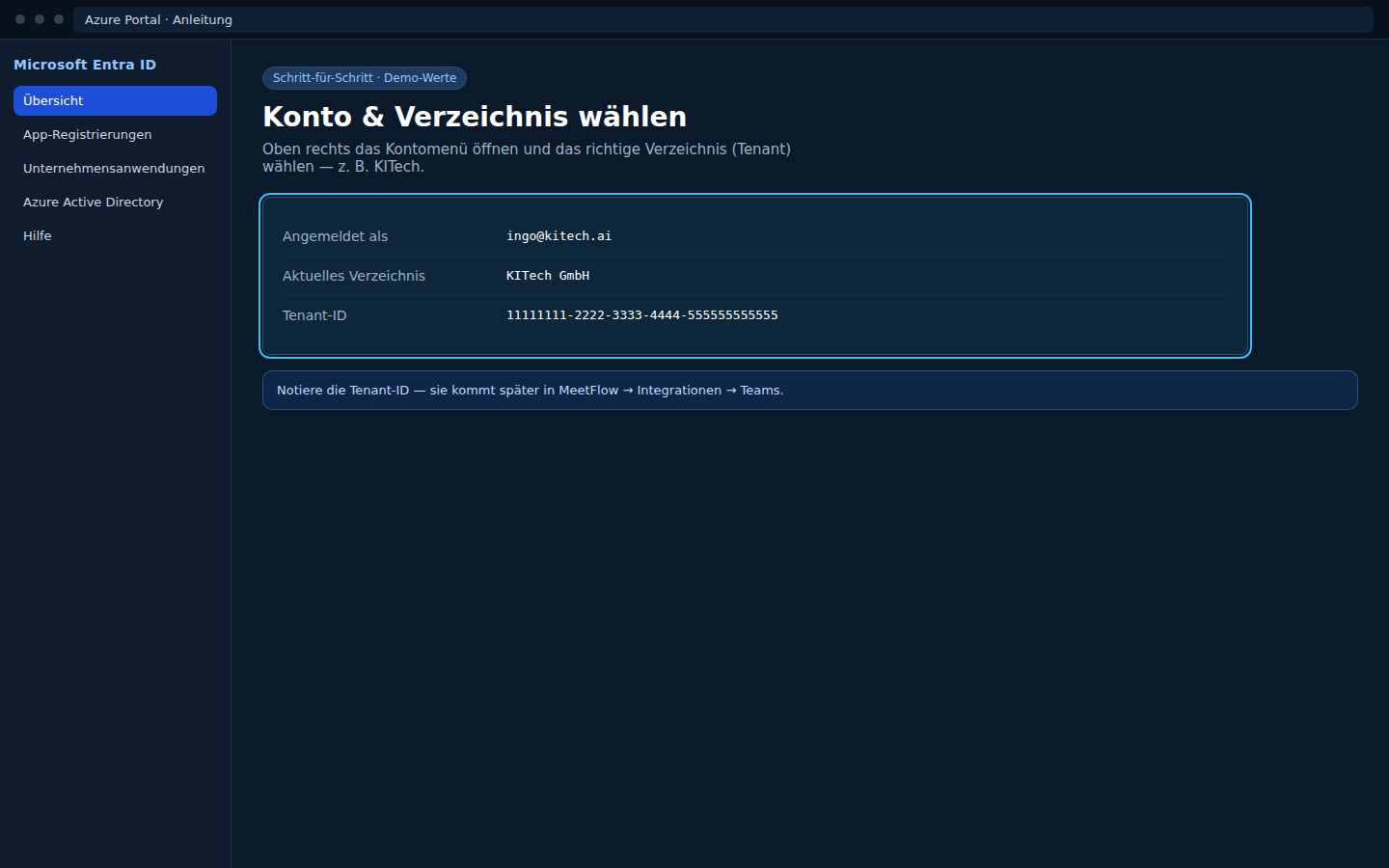
Step 2: Create a new registration
- Microsoft Entra ID → App registrations → New registration.
- Name: e.g.
MeetFlow(for easy recognition later; name does not need to be unique). - Supported account types: Accounts in this organizational directory only (single tenant).
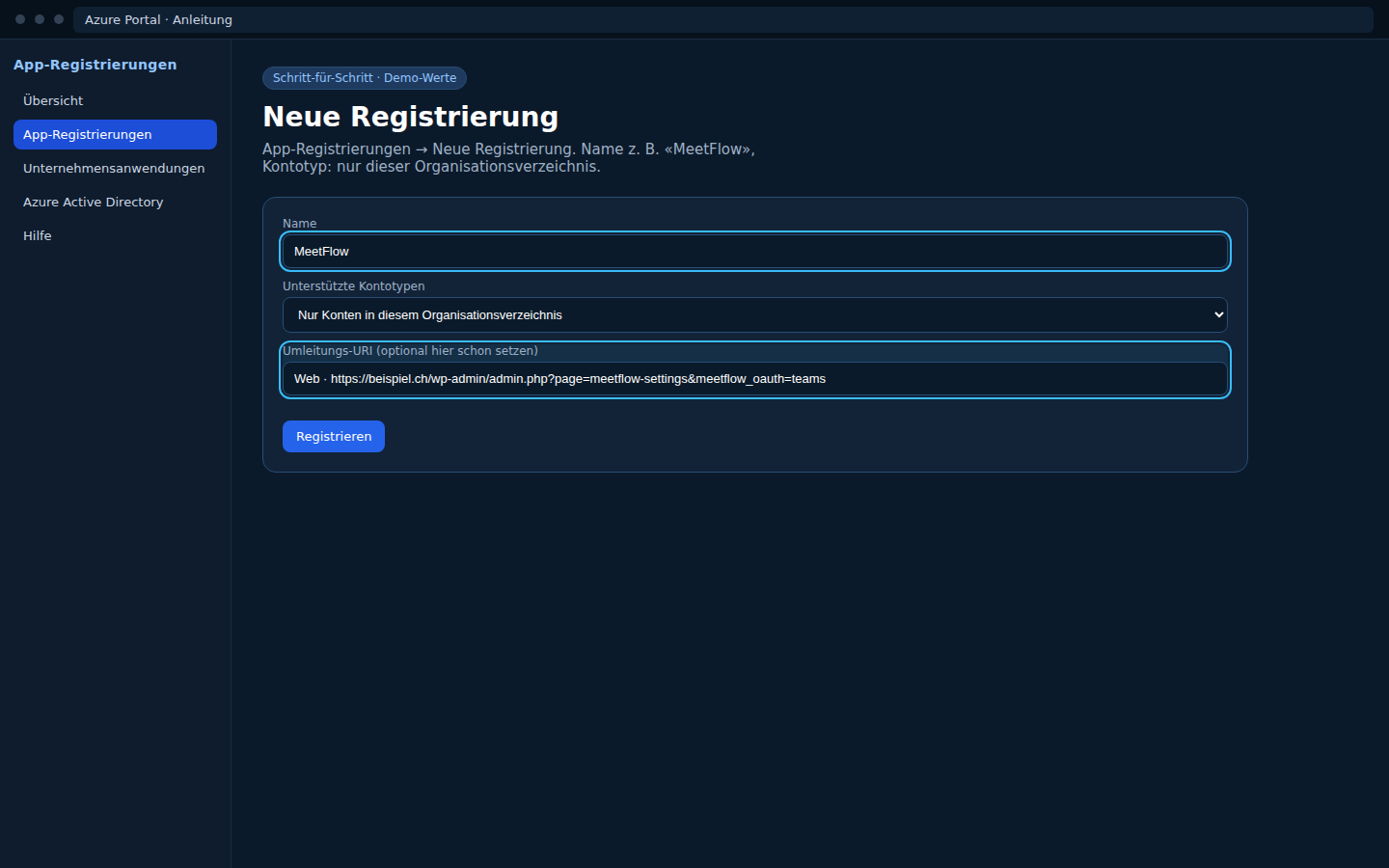
Step 3: Set redirect URI
- Platform: Web.
- Enter redirect URI exactly (Microsoft validates character by character):
https://dev.lireno.ch/wp-admin/admin.php?page=meetflow-settings&auth=microsoft - Production: copy URI from MeetFlow Redirect URI field — adjust per domain.
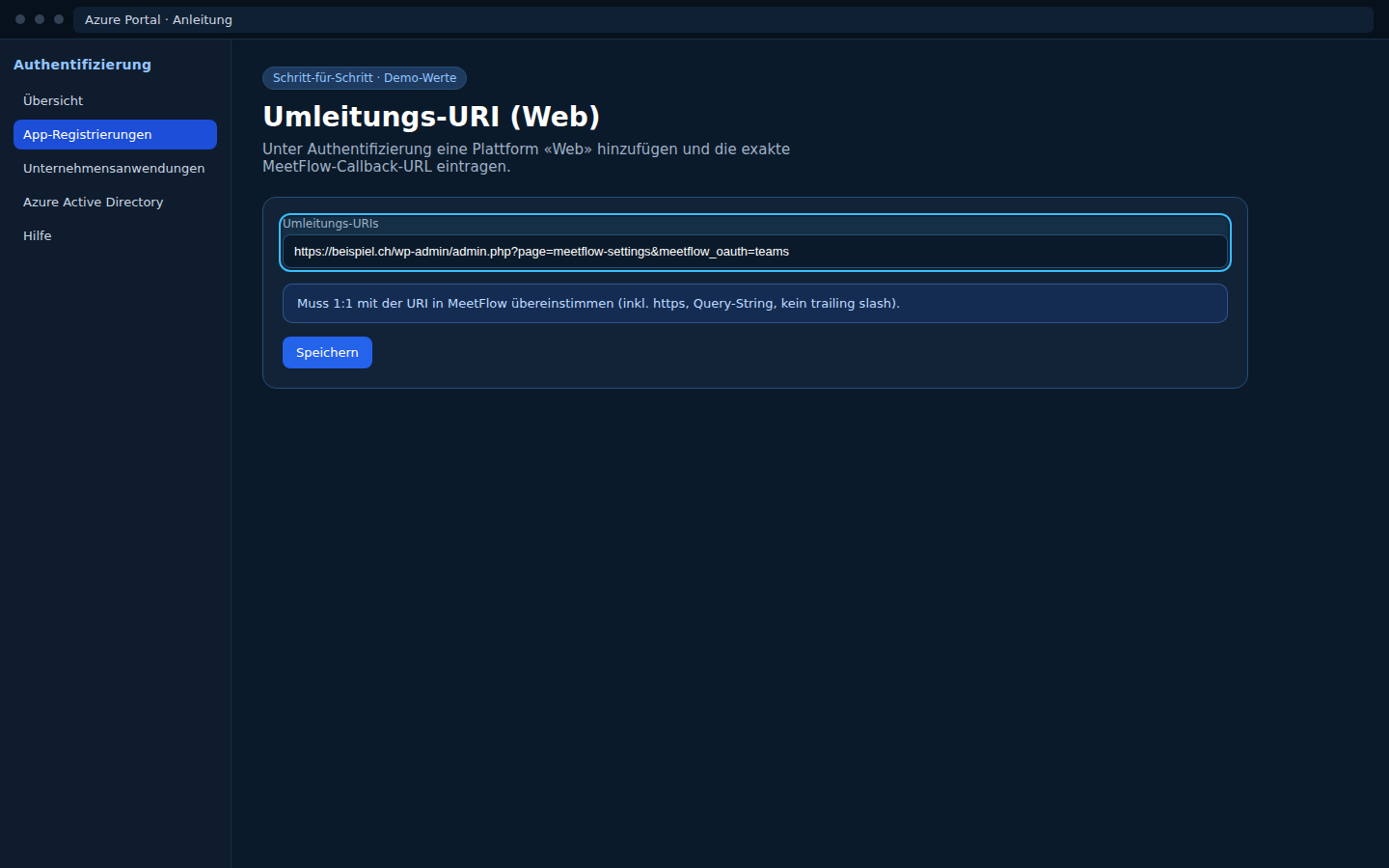
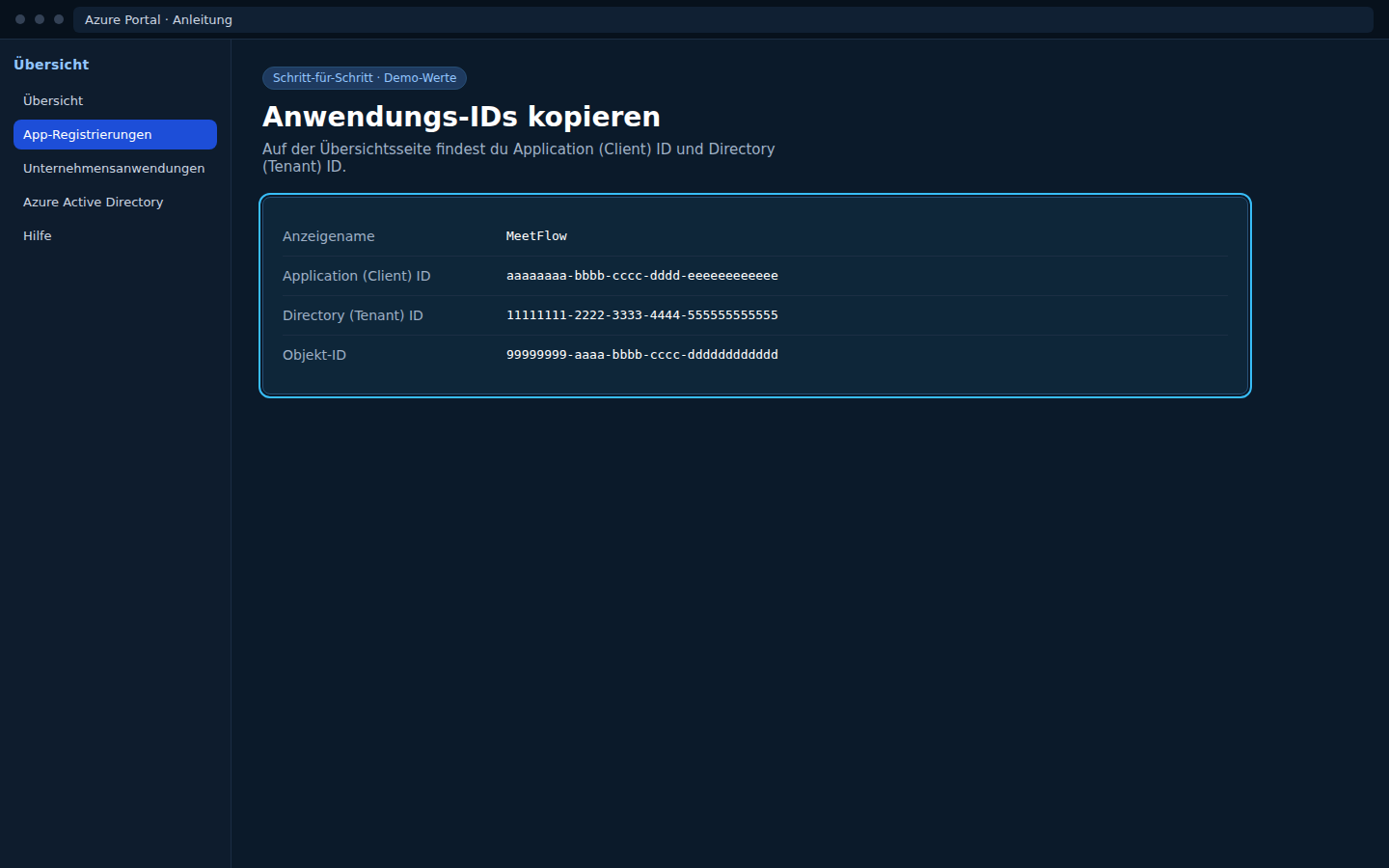
Step 4: Copy IDs from Overview
After Register, you land on the app Overview page.
| In Azure (Overview) | In MeetFlow |
|---|---|
| Application (client) ID | Client ID |
| Directory (tenant) ID | Tenant ID |
Both values come from the same Overview page — do not mix tenants.
Step 5: Create client secret
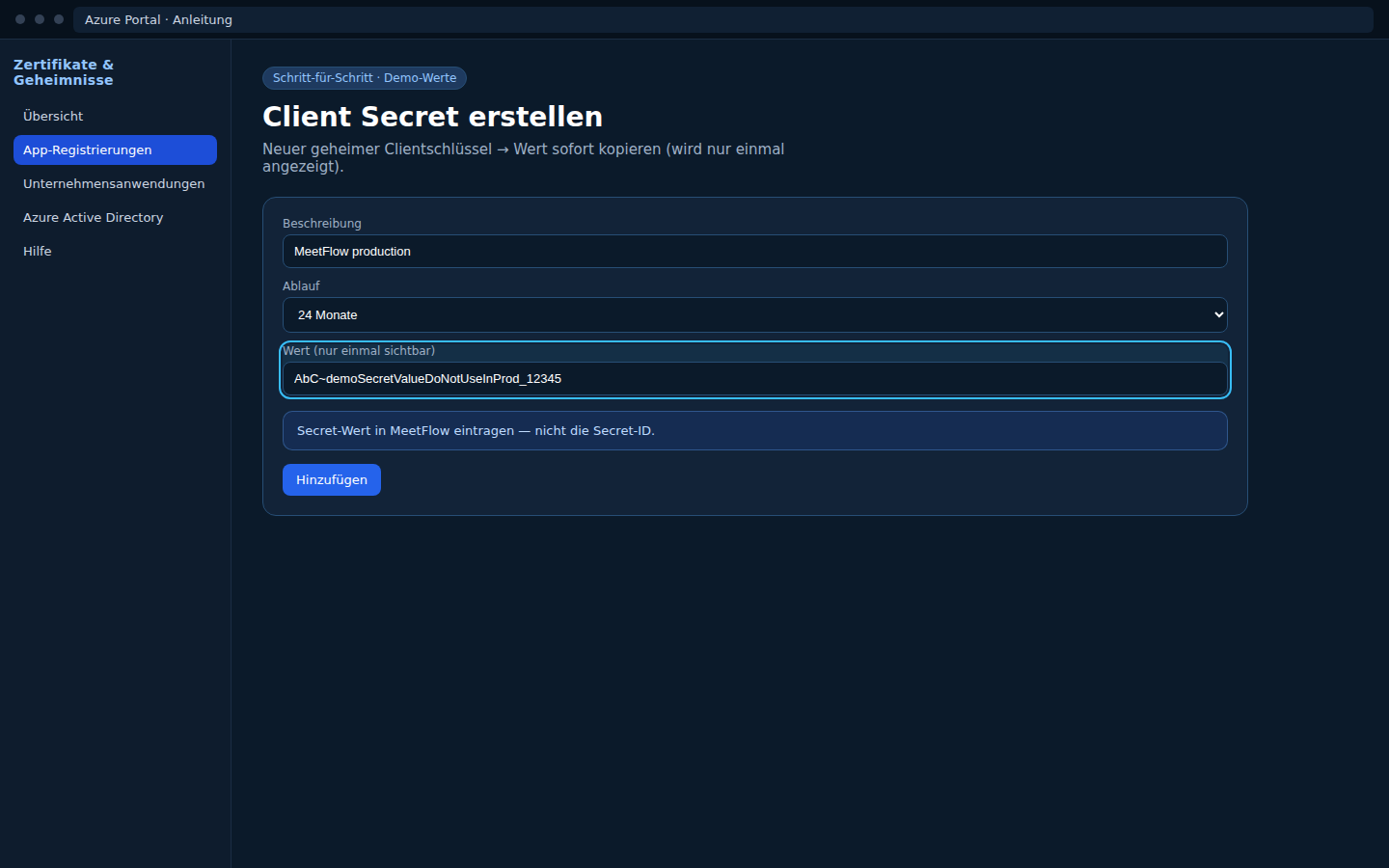
- Certificates & secrets → New client secret.
- Description + expiry → Add.
- Copy the Value immediately — Microsoft shows it only once.
| In Azure | In MeetFlow |
|---|---|
| Value (client secret) | Client Secret (password field) |
Step 5b: API permissions (one-time)
- API permissions → Add a permission → Microsoft Graph → Delegated permissions.
- Enable
Calendars.ReadWrite,OnlineMeetings.ReadWrite,User.Read. - Grant admin consent (Global Admin or authorized admin).
Step 6: Enter in MeetFlow
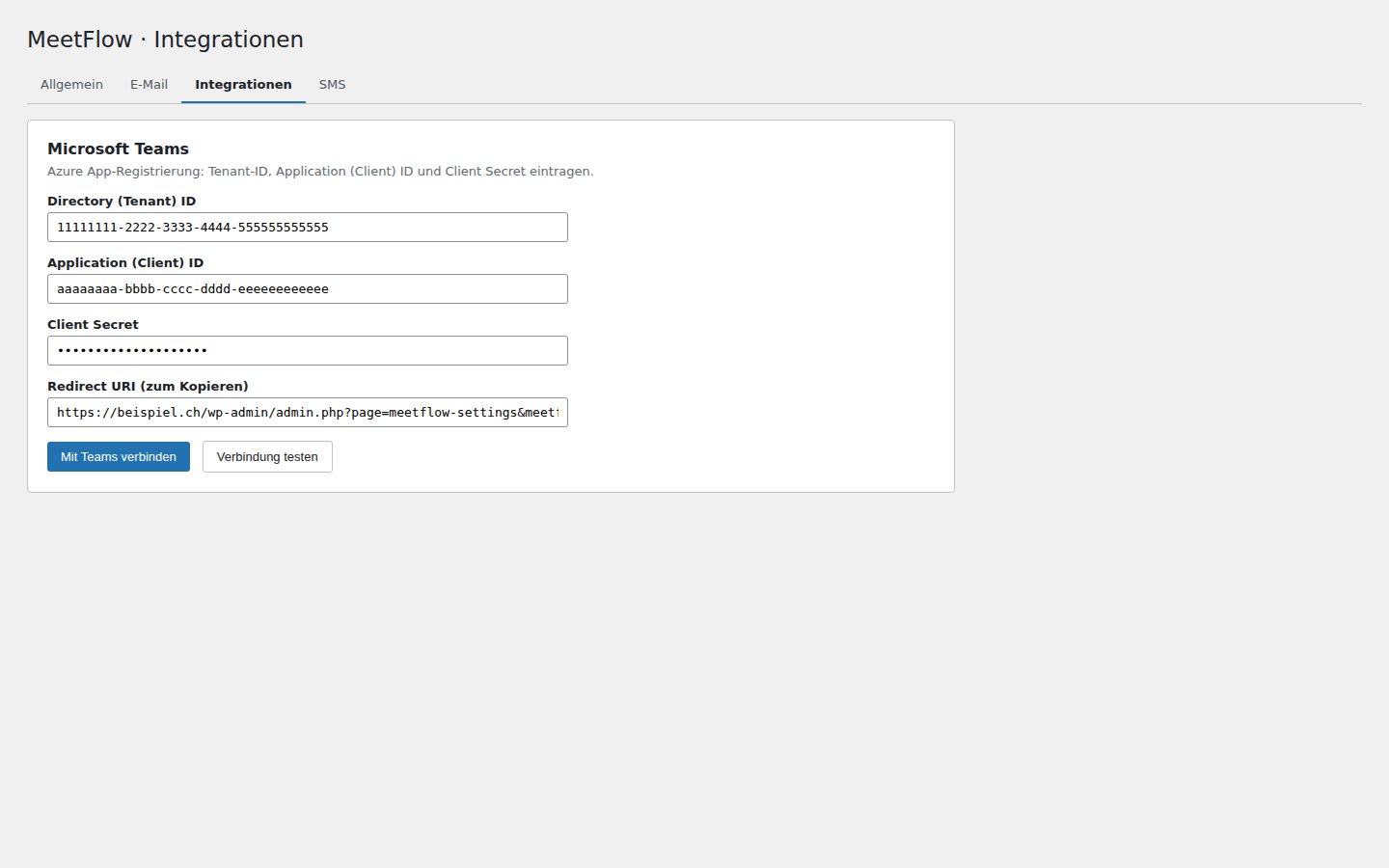
MeetFlow → Settings → Video Conference → Microsoft Teams
- Client ID ← Application (client) ID
- Tenant ID ← Directory (tenant) ID
- Client Secret ← client secret Value
- Save Settings → Connect with Microsoft
Step 7: Test with the correct account
- Sign in with
ingo.zimmermann@KITechai.onmicrosoft.com(or another account in the same KITech tenant). - Select provider Microsoft Teams → Test connection.
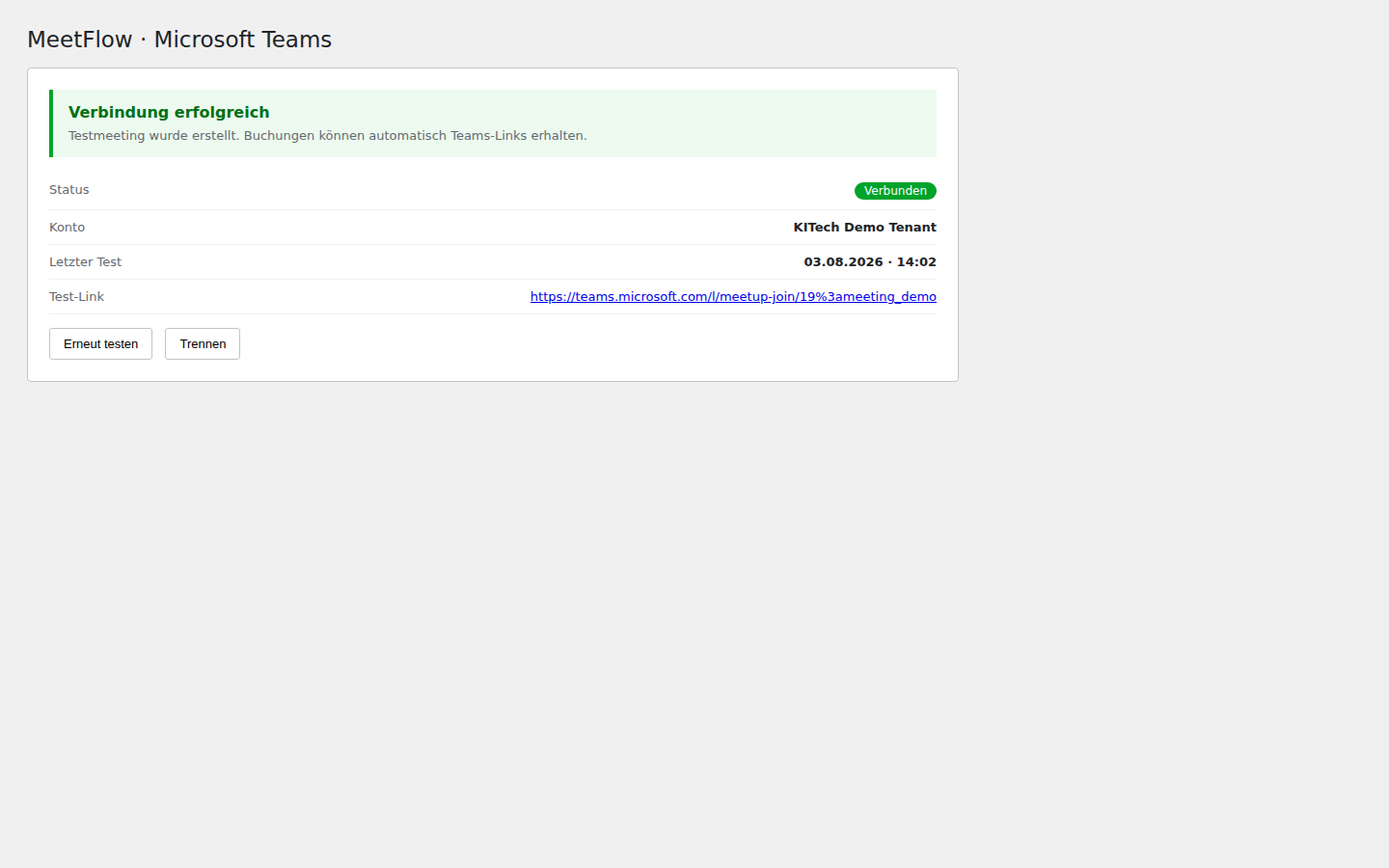
- On success: status Connected to Microsoft — no more AADSTS700016 / 90002 / 900023.
common with a single-tenant app). Re-registering cleanly in the correct tenant and using all three values from the same app is the most stable fix.
Quick check before reconnecting
- App registration visible under KITech → App registrations?
- Application ID in MeetFlow = Application ID on this app's Overview?
- Tenant ID = Directory ID on the same Overview page?
- Redirect URI in Azure = Redirect URI in MeetFlow (character by character)?
- Login account belongs to KITech tenant (
@KITechai.onmicrosoft.comor linked domain)?
Google Meet / Google Calendar (OAuth)
Symptom: redirect_uri_mismatch, access_denied, no Meet link after booking, or OAuth fails — Calendar API missing, consent screen incomplete, test user not added, or redirect URI does not match MeetFlow exactly.
Google Cloud Console Enable Google Calendar API OAuth 2.0 (Google) Documentation — Google Meet setup
Common errors
| Error / symptom | Cause | Fix (short) |
|---|---|---|
redirect_uri_mismatch |
Redirect URI in Google ≠ Redirect URI in MeetFlow. | Copy URI exactly from MeetFlow; do not change trailing slash. |
access_denied / app in testing mode |
Google account is not a test user on the consent screen. | OAuth consent screen → Test users → add your Gmail account. |
| No Meet link in confirmation | Calendar API not enabled or OAuth not connected. | Enable API → Connect with Google → select «Google Meet» provider. |
Step 1: Google Cloud project
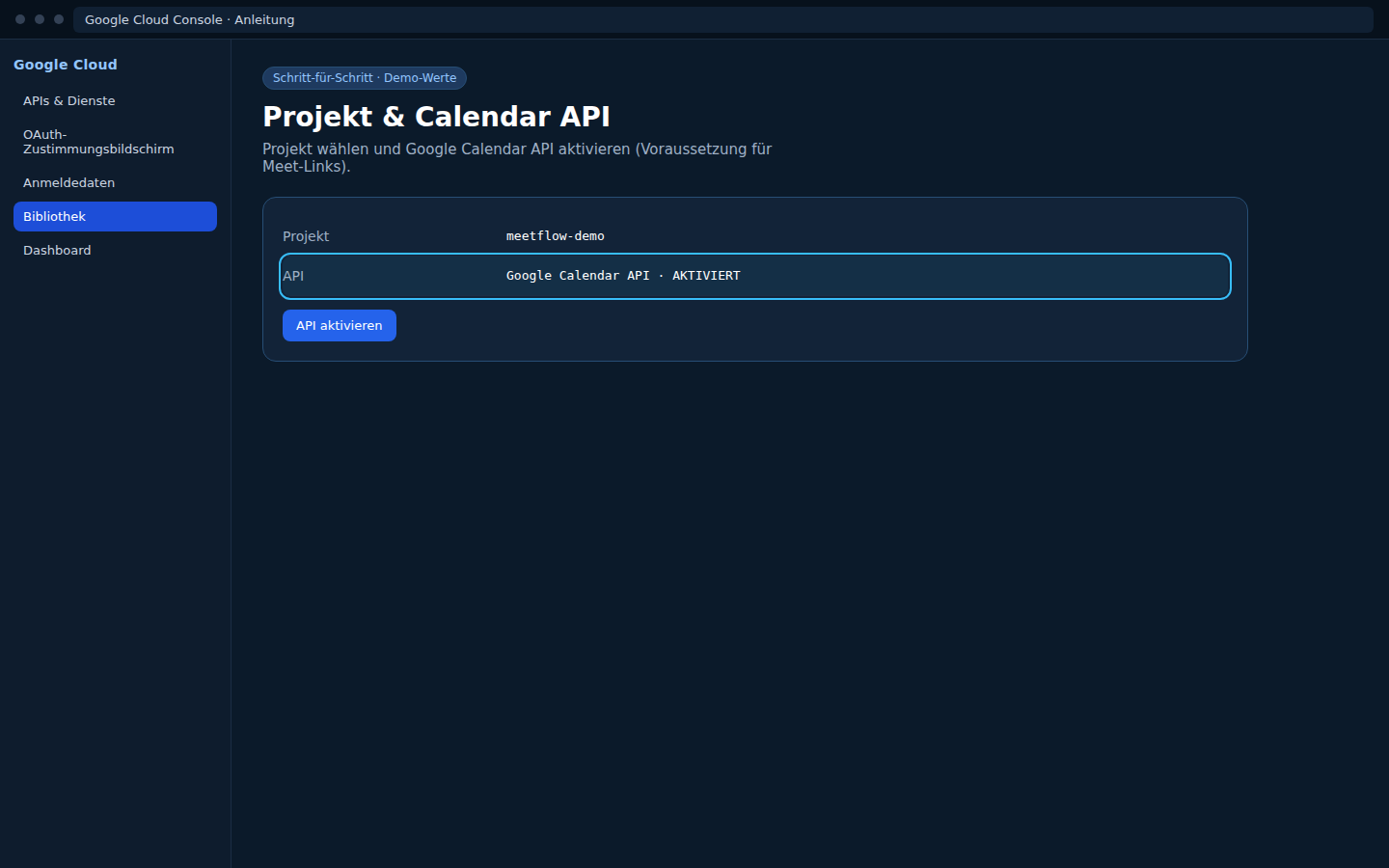
- Open Google Cloud Console → select or create a project.
- APIs & Services → Library → «Google Calendar API» → Enable.
- If not done yet: configure OAuth consent screen.
- Testing with regular Google accounts: User type = External.
Step 2: OAuth consent screen
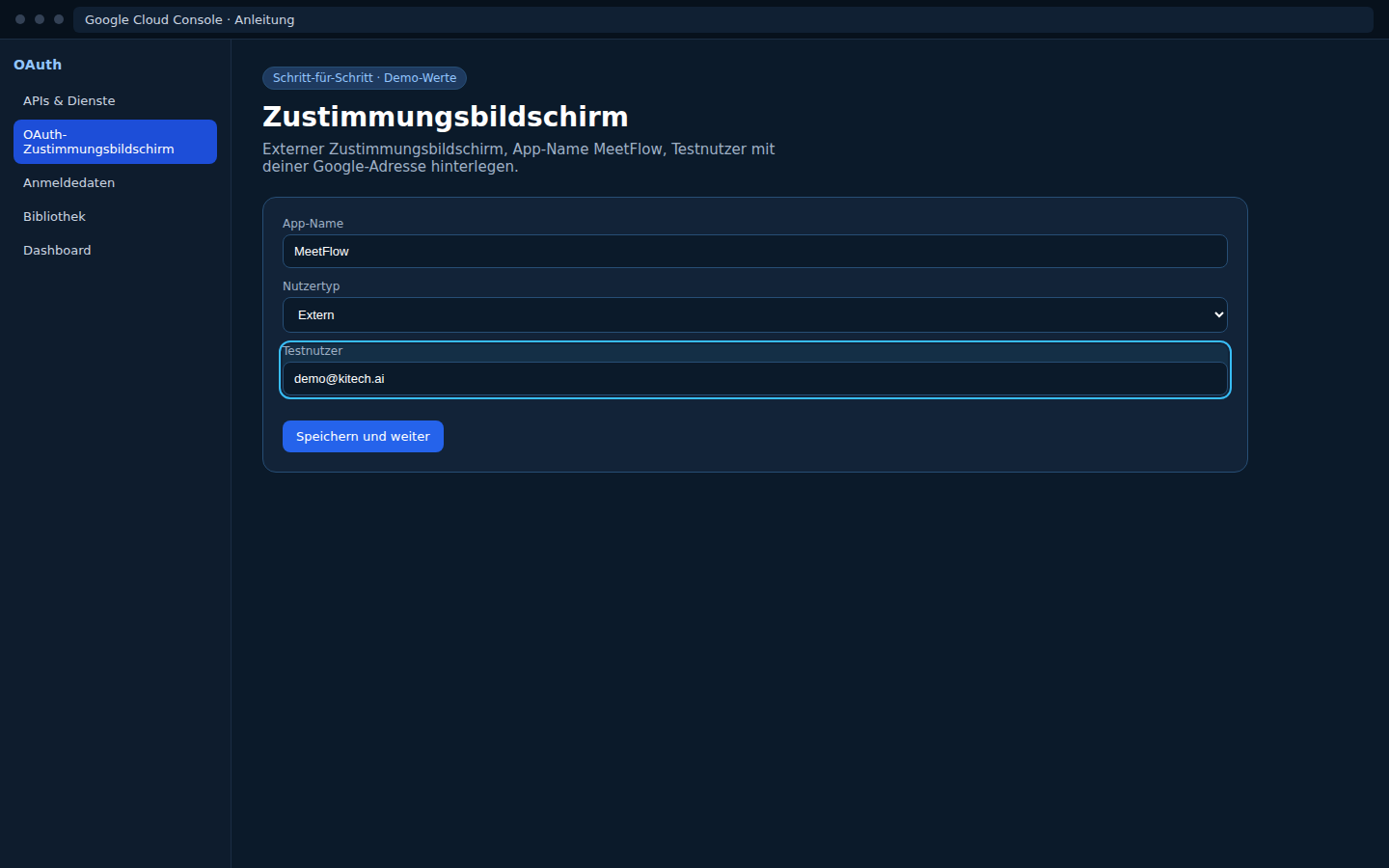
| Google field | Example value |
|---|---|
| App name | MeetFlow |
| User support email | your contact email |
| Authorized domains | lireno.ch (no https://) |
| Test users (testing mode) | Google account used for OAuth |
Step 3: Create OAuth client
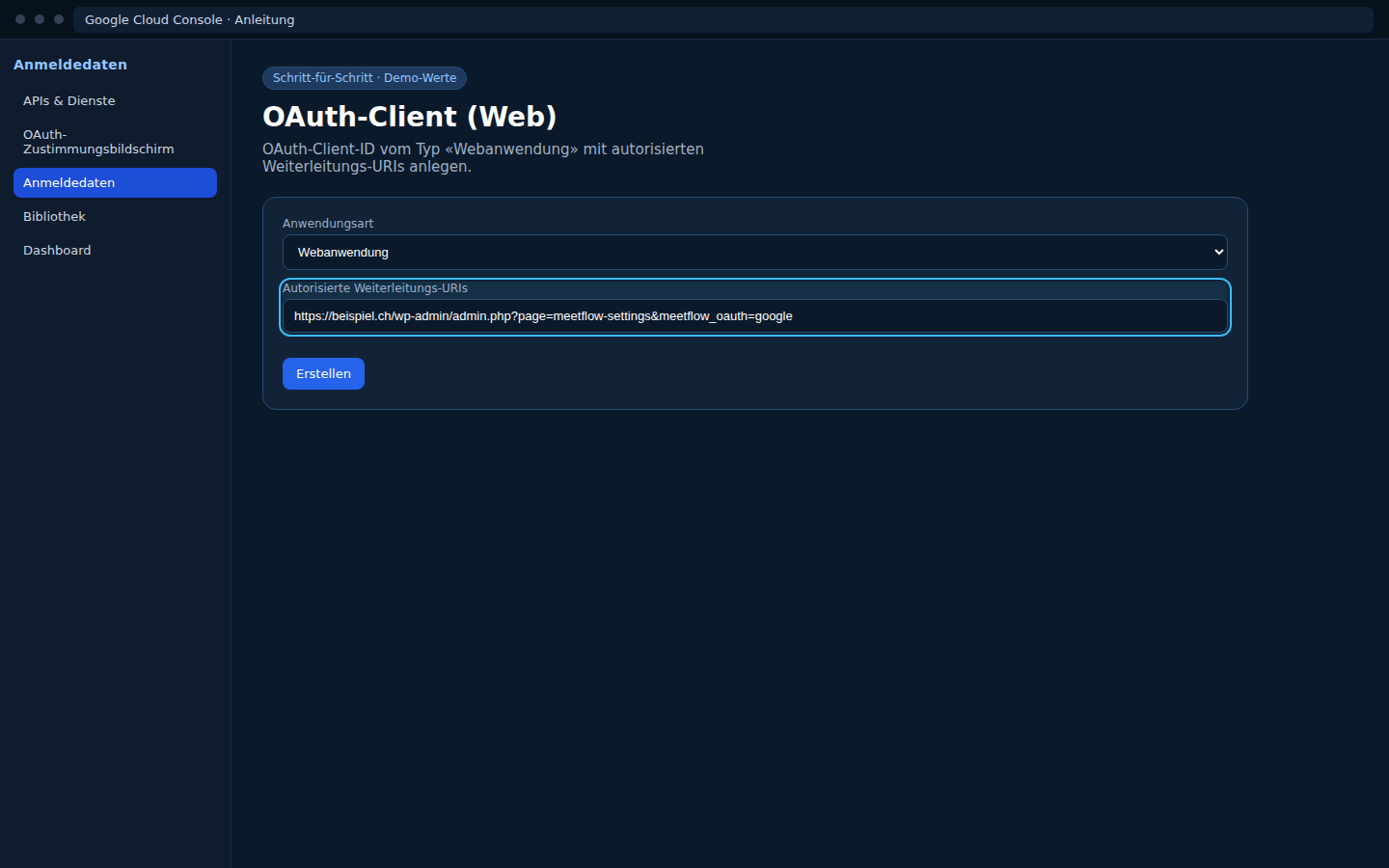
- APIs & Services → Credentials → Create credentials → OAuth client ID.
- Application type: Web application.
- Name: e.g.
MeetFlow Google OAuth. - Authorized JavaScript origins:
https://dev.lireno.ch - Authorized redirect URIs:
https://dev.lireno.ch/wp-admin/admin.php?page=meetflow-settings&auth=google
(copy exactly from MeetFlow Redirect URI field)
Step 4: Copy credentials
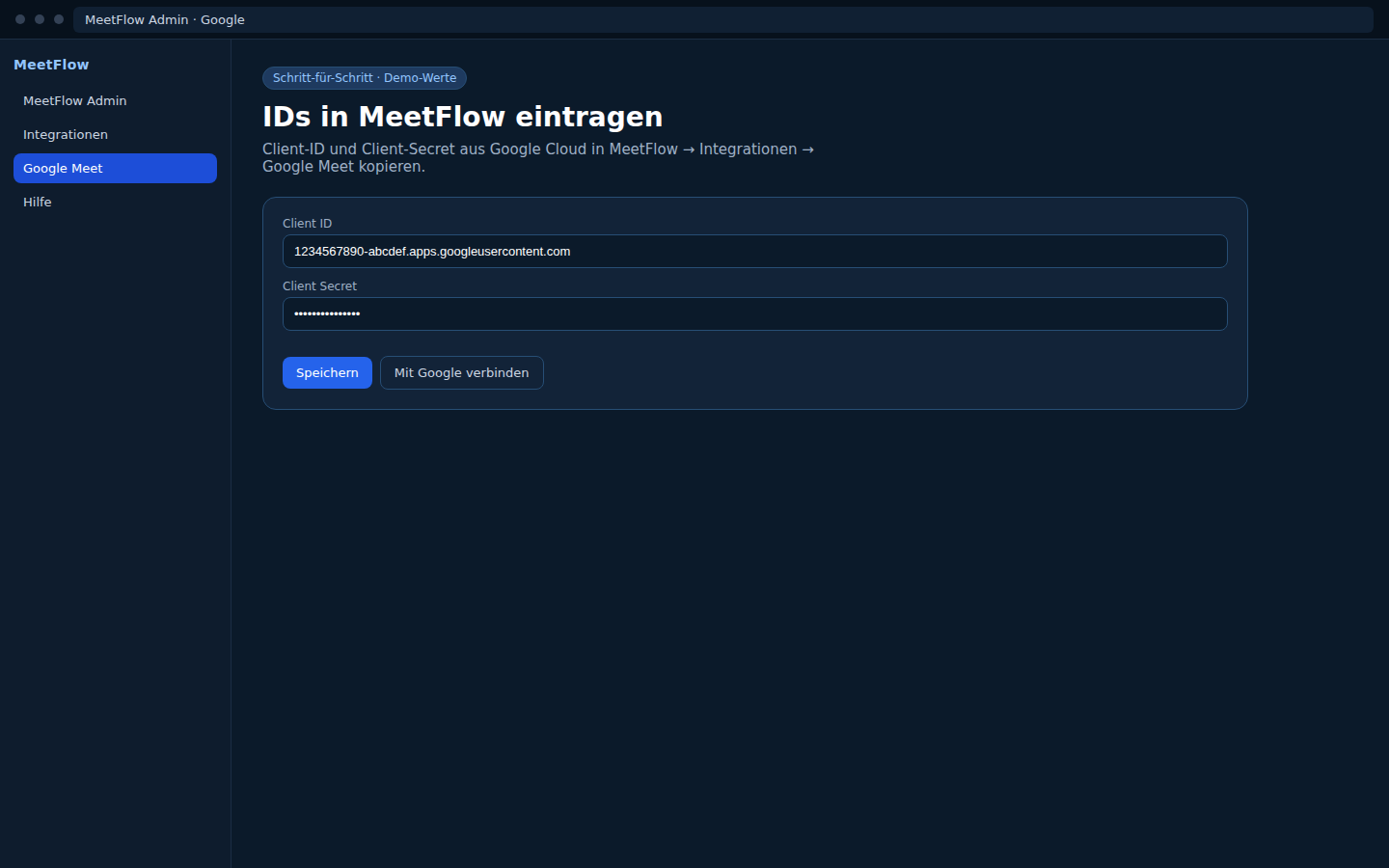
After creation, Google shows Client ID and Client secret — secret is only fully visible once.
| In Google (OAuth 2.0 client) | In MeetFlow |
|---|---|
| Client ID | Client ID |
| Client secret | Client Secret |
Save Settings in MeetFlow.
Step 5: Connect MeetFlow and test
- Click Connect with Google.
- Sign in with the Google account listed as a test user (while app is in testing mode).
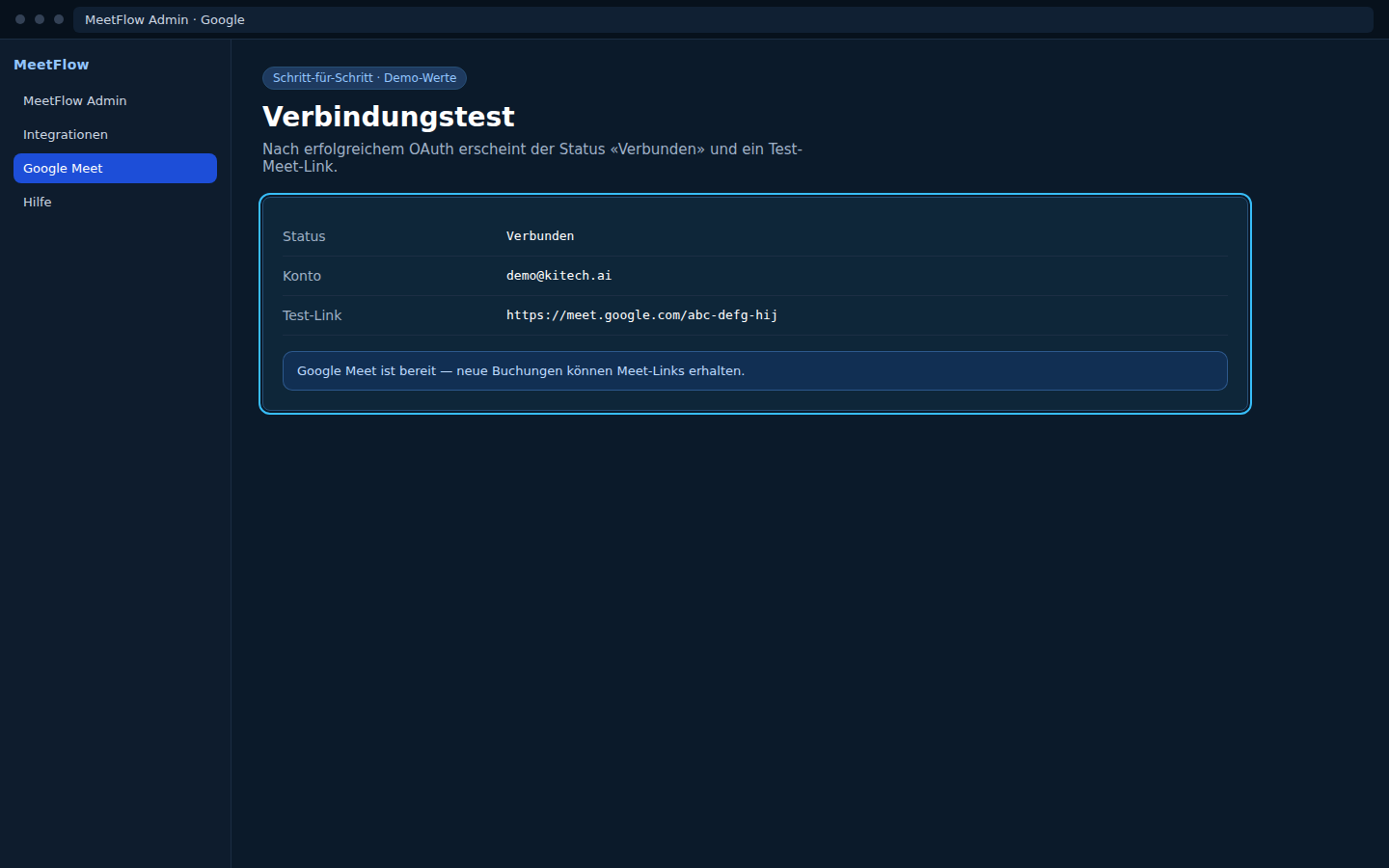
- Select Google Meet as active provider.
- Create a test booking → verify Meet link in confirmation/email.
conferenceData. Without Calendar API and valid OAuth, no automatic Meet link is generated — even if «Google Meet» is selected as provider.
Quick check
- Calendar API enabled in the same project as the OAuth client?
- Redirect URI = MeetFlow Redirect URI (character by character)?
- JavaScript origin = site origin without path (
https://dev.lireno.ch)? - Test user = account used for «Connect with Google»?
- MeetFlow status: Connected to Google?
Meeting link not created
- Pro license active?
- Provider selected as «Active provider» and connected (green status)?
- Test booking in admin under MeetFlow → Bookings — Meeting URL column?
- Teams: admin consent granted? Wrong tenant? → Microsoft troubleshooting
- Google: OAuth connected? Calendar API enabled? → Google troubleshooting
- Zoom: Pro account?
SMS / Twilio
- SMS Reminder tab:
sms_reminder_enabledorsms_on_bookingactive? - Twilio SID, token, sender number (+E.164) correct.
- SMS provider Twilio: No API URL needed — MeetFlow uses
https://api.twilio.com/2010-04-01automatically. - Custom API: Only when provider is «Custom API» —
custom_sms_api_urlmust be reachable (your gateway, not Twilio’s default). - Twilio Console → Logs: error code 21211 = invalid number.
WhatsApp webhook
- Requires the «Grow» or «Scale» plan.
- Webhook:
https://YOUR-DOMAIN/wp-json/meetflow/v1/whatsapp/webhook - Verify Token in MeetFlow = Meta Developer Console.
- Permalinks not «Plain» — otherwise REST 404.
Reports: bookings missing (Grow+)
Symptom: MeetFlow → Reports shows «No bookings in this period» although bookings exist — or a new booking doesn't show up.
- Pro version: use 2.2.42+ — older versions filtered only from the start of the current month until today, so future appointments were missing.
- «Appointment date» vs. «Created date» filter: a booking created today with an appointment next week counts under the future date when filtering by appointment date. Switch to Created date to filter by creation time.
- Widen the range: set «From»/«To» generously (default since 2.2.42: ±1 year).
- Cancelled bookings are always included (Cancelled card + status table + booking list).
- Check your plan: Reports require Grow or Scale — if you see «Reports require a Grow or Scale plan», verify under MeetFlow → License.
- REST check (logged in as admin):
/wp-json/meetflow/v1/stats?date_from=2025-01-01&date_to=2027-01-01
Webhooks & automation (Grow+/Scale)
Symptom: «Request failed» on the test button, Zapier/n8n/Make receives nothing, or the REST endpoint returns 401/403/404.
«Request failed» on «Send test webhook»
- Install Pro 2.2.43+ — in 2.2.37–2.2.42 the nonce check of the «Send test webhook» and «Regenerate API key» buttons always failed (fixed in 2.2.43).
- After updating: hard-reload the page with Ctrl+Shift+R (JS cache).
- Logged in as administrator? The buttons require
manage_options.
«Add at least one webhook URL first»
- Enter URLs and save settings — the test button only reads saved URLs.
- Only valid http(s) URLs, one per line.
Automation tool receives no data (Zapier / n8n / Make)
- Webhook URL copied exactly?
- Zapier:
https://hooks.zapier.com/hooks/catch/…/…/ - n8n:
https://your-n8n.example.com/webhook/…— workflow must be active - Make:
https://hook.eu1.make.com/…— scenario must be ON
- Zapier:
- «Booking created» event enabled and saved?
- First click «Send test webhook» in MeetFlow, then test in the tool:
- Zapier: «Test trigger»
- n8n: execution log / «Listen for test event»
- Make: «Determine data structure» / «Redetermine»
- Test payload has
event: webhook.test— real bookings sendbooking.createdwith a fullbookingobject. - Automation must be active (Zap published, n8n workflow active, Make scenario ON).
Setup guides: Zapier · n8n · Make
n8n: webhook not received
- Webhook node set to POST?
- Workflow activated (not just saved)?
- Self-hosted n8n: valid TLS certificate? Can WordPress reach the URL via HTTPS?
- Check Executions in n8n for incoming requests (including failed ones).
Make: webhook not received
- After test webhook in Make, run «Determine data structure» — otherwise mapping fields are missing.
- Scenario toggle ON (not just a draft)?
- Correct Make region (EU vs. US) — hook URL must match your instance.
REST polling fails (Zapier / n8n / Make)
- 401/403: send the API key as header
X-MeetFlow-API-Keyor queryapi_key; copy the key from Settings → Integrations. After «Regenerate», only the new key is valid. - 404: the endpoint
/wp-json/meetflow/v1/integrations/bookingsonly exists with a Scale license; permalinks must not be «Plain». - Quick test:
curl -s "https://YOUR-DOMAIN/wp-json/meetflow/v1/integrations/bookings?limit=5" -H "X-MeetFlow-API-Key: KEY"
WaNotifier: WhatsApp message not delivered
- Use the «Send Message Template» action instead of «Within Active Session» — the latter needs an open 24-hour window.
- Recipient number with country code (
+41…) — for customer numbers the booking form must capture the number accordingly. - The template must be approved by Meta; the WaNotifier notification must be «On-going».
- Check Zapier Zap History: did the action run, what was the response?
WaNotifier: API key not found (Zapier popup)
Symptom: when adding a WaNotifier action in Zapier, a «Connect to Zapier» popup appears with «Enter API Key (required)» — you can't find the key in WaNotifier.
WaNotifier — API key (official) Documentation — WaNotifier setup
How to find the key
- Open app.wanotifier.com and log in (same account as your number).
- Sidebar: Automations → Integrations.
- Direct Integrations → API Integration → Manage.
- Tab API Keys → field My API Key → Copy.
- Paste into Zapier popup → Connect.
Alternative path
Sidebar: expand WhatsApp number → Settings (gear) → tab API / API Keys.
Still no key?
- Correct WaNotifier account? (organisation with connected business number)
- WhatsApp number fully connected and verified?
- Reload page / try another browser.
- Optional: Add New Key in API Keys tab.
- WaNotifier help: help.wanotifier.com
Transactional Notification: «No options are available»
Symptom: in Zapier the Transactional Notification field shows «No options are available» — dropdown stays empty.
Checklist (in this order)
- Utility message template approved? WaNotifier → Message Templates → status Approved.
- Notification created? WaNotifier → Notifications → Add New → Type: Transactional / Integration / API, Trigger: API request to a Webhook URL, template selected → Save → status On-going.
- Correct WaNotifier account in Zapier? Reconnect with the right API key.
- Refresh Zapier: Reconnect account or reload step → reopen dropdown.
Full guide: WaNotifier documentation · WaNotifier Zapier guide · Meta vs Zapier
White Label: branding still visible
- Scale plan required (otherwise the tab shows an upgrade notice).
- Checkbox ticked and Save settings clicked?
- Clear frontend caches (page cache plugin, CDN, browser Ctrl+F5).
- The preview in the «White label» tab shows the server state — if the frontend differs, it's a caching issue.
REST API 404 / JSON errors
- Re-save permalinks.
- Security plugin blocking
/wp-json/? Add whitelist. - Test:
GET /wp-json/meetflow/v1/timeslots?date=2026-08-01
Cache & theme conflicts
- Test with default theme (Twenty Twenty-Four).
- Page builder: embed shortcode in native WP page.
- Disable minify/combine JS for admin and frontend scripts.
- Design tweaks: Settings → Design → Custom CSS instead of patching theme files (Free & Pro).
Translations / wrong language
Symptom: MeetFlow stays English or shows mixed languages.
- Site language: Settings → General → Site Language.
- Admin language: Users → Profile → Language (overrides in wp-admin).
- Polylang/WPML: Place shortcode on the correct language page; switch language and reload.
- Loco Translate: text domain
kitech-meetflow— clear cache after edits. - Old ZIP: Free/Pro 2.2.9+ includes complete
languages/*.mo(de, fr, it). - Pro uses the same free core — no separate Pro translation pack.
Details: Documentation — languages
Still having issues?
Email info@kitech.ai with:
- MeetFlow version (Free/Pro)
- WordPress + PHP version
- Provider (Teams, Zoom, …)
- Error message / screenshot
- Relevant lines from
debug.log(no secrets)